FAQs & Support

Need help logging in or accessing your resources?

Having trouble printing?

Get answers to FAQs and troubleshooting tips below.

What can we help you with?

General Questions

My resources are sold in my resource shop as well as at TeachersPayTeachers. Resources in both shops are identical. Sale prices may fluctuate from location to location due to sales or coupons available.

Yes!  I am able to offer special customer and product discounts in my own shop that TPT does not allow.

Each product listed, whether purchased in my shop or on TPT has identical content. The regular price of each resource is identical no matter where you purchase. Individual resource prices may fluctuate due to sales or coupons.

Due to the digital nature of these products, all sales are final and non-refundable. Please review product descriptions carefully before purchasing. If you receive the wrong file, are charged more than once, or experience a technical error on our end, please contact malia@maliarivera.com within 7 days so we can resolve the issue.

Yes! You can re-download your purchase from your account on this website at any time. For Teachers Pay Teachers purchases, please log in to your TPT account to access your files. We recommend saving a copy of your resources on your own device or cloud storage for easy access.

School email filters can be very strict and often block emails. This means you may not receive the receipt and download link for your purchases.

Using a personal email address ensures these important emails land in your inbox. If you purchased with a school email and don’t see your files, please contact support so we can help.

While I love that you’d like to share, it is against the Terms of Use to email or redistribute free or paid resources from my website or shop (as well as resources purchased on TeachersPayTeachers). Each resource is for single classroom or personal use only. 

You will be breaking copyright laws if you share the resources you have purchased or downloaded. This includes but is not limited to emailing files, uploading to shared drives and sharing logins.

If a colleague or friend would like a copy of the resource, I’d appreciate you sharing a link ​so they can purchase a single use license for themselves. Thank you for respecting my terms of use!

For more details, please see our Digital Product License section in the Terms & Conditions

In general, resources in my shop are offered as is. Please read the resource description carefully to ensure that the resource meets your needs.

However, I do accept editing requests from time to time depending on the nature of the revision. If you would like to request a custom edit, please submit a support request. Please understand that not all custom edits will be accepted.

Sometimes my emails land in your junk or spam folder, especially if it’s the first time you’ve gotten a message from me. If you don’t see an email you’re expecting, check there first. 

If you find the email in your spam or junk folder, mark it as “not spam” or move it to your inbox. Then add my email address to your contacts. This will help future emails arrive correctly. 

If you don’t find the email in your spam or junk folder, submit a support request so I can troubleshoot this for you. You will receive a response within 2 business days.

Account Support

You must have an account to purchase from my shop. Don’t worry—your account will be created automatically when you make your first purchase.

Once you have an account, you’ll be able to view your past orders, access previous purchases, and update your details. You’ll also be able to shop quickly as your information will be saved when you’re logged in as a user.

You can access your account by clicking My Account in the menu at the top or at the bottom of the page.

Once logged in, you can view past purchases and re-download your files anytime.

Click the ‘Lost your Password’ link on the My Account page, enter your email, and you’ll receive a reset link. If you see an error that your email doesn’t exist, you may have mistyped it during account creation—submit a support request and we’ll help fix it.

This usually means your email was entered incorrectly during account setup, or you registered with a different email address. Please submit a support request and we’ll resolve it within 2 business days.

You can update your email address anytime by logging into your account and editing your details in the dashboard. If you’re unsure of the error or can’t log in, submit a support request and we’ll update it for you.

No. Each account is tied to a single email address. If you need to switch to a new email, please update your account details or contact support.

At this time, accounts cannot be merged. Please continue using one preferred account for future purchases

Purchasing and Payments

We accept most major credit cards via Stripe payments. Stripe is one of the most widely trusted payment processors, used by many high-profile companies you already shop with, so you can rest assured your information is safe!

We also accept PayPal payments.

We do NOT accept personal checks or money orders.

Payments are processed securely through Stripe using SSL encryption. Your payment details are stored only by Stripe—we never see your full card number (just the last 4 digits).

We are happy to accommodate purchase orders from schools and districts. Please submit a support request to start the process. Once approved, we’ll provide an invoice and resources will be released upon payment.

Receipts for all purchases are stored in your account. Simply log in, go to Order History, and you’ll be able to view and download them anytime

All prices are listed in USD. Your credit card provider or PayPal will automatically convert your payment into your local currency if needed.

Accessing your resources

There are three places to access your purchases:

  • Order confirmation page
  • Email receipt
  • Downloads page in your account

Most resources are delivered as PDF files, Google Drive links, or ZIP folders. You’ll be able to download immediately from your order confirmation page, your email receipt, or the Downloads section of your account.


Yes! Once you purchase a resource, you’ll have ongoing access in your account. For your peace of mind, I also recommend saving a copy to your computer or USB drive.

All you need to do is log into your account. Click on My Downloads, and you’ll be able to download all of your purchases there. 

Have you double checked your spam/promotions/junk for your receipt? 

This is usually because you have purchased your products using a different email address/account. If this happens, I can merge your accounts together. Just submit a support request with detailed information so it can be fixed for you.

Because there are so many types of phones and tablets, I can’t guarantee resources will download correctly on all devices. For best results, please use a laptop or desktop computer with a PDF viewer installed.

​I recommend that you download your purchases onto a computer or laptop. Please make sure you have a program that allows you to download and view PDF files on your computer.

​In order to protect files from being shared illegally, all download links are protected so that only the person that purchased the product can use the link.

You may see this error message on a resource that you purchased if you click the download link in an email but are already signed into the site with a different email address or if you have forwarded the purchase email to another email address. 

This message just means the system is protecting your files. Simply log into your account with the email you purchased under and go to My Downloads — your files will be waiting for you there.

Try right-clicking the download button and selecting ‘Save Link As.’ Also, make sure pop-ups are allowed for this site, as downloads often open in a new window.

Printing & Editing Issues

All resources are delivered as PDF files in high resolution, ready for you to print at home or with a printing company. Follow these steps to print your PDF…

1. Click to download the file from your account.
2. Be sure to save the file to your desktop computer rather than just open the resource.
3. Open the file with Adobe Acrobat Reader. (You only need the free version!)
4. Select File>Print and then ​ensure the printer settings are correct.

I recommend printing at High Quality for the ​most accurate and highest print quality.​

If you’re having trouble printing a PDF, please make sure you are opening the file with the latest version of Adobe Acrobat Reader (free download). Printing directly from your web browser or from the Preview app on Mac often causes issues like:

  • black boxes behind images

  • fonts not printing correctly

  • pages cutting off

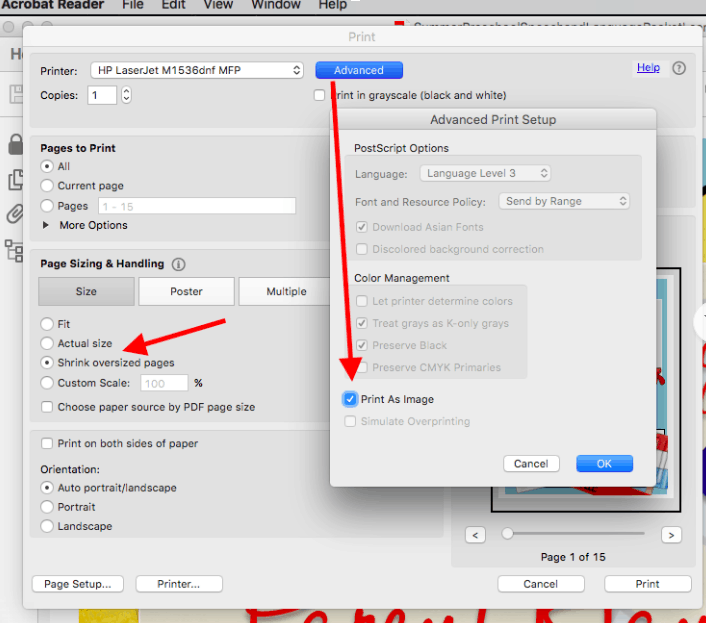
Follow these steps…

1. Open the PDF file with Adobe Acrobat Reader
2. Click “Print”
3. In the “Page Sizing & Handling” section, select “Shrink Oversized Pages” if needed.
4. Click on “Advanced”
5. Check the “Print as Image” box.
6. Print the document
All resources are designed to be printed on standard 8.5 × 11 inch paper. If parts of the page are being cut off, be sure to select ‘Fit to Page’ in your printer settings to ensure the entire page prints correctly.

Support Request

If you didn’t find the answer to your question on this page or still need help, submit a support request below.